

Wireless soundbar interference can be caused by interference, poor positioning, outdated software, or poor quality sources. These issues often manifest as intermittent sound, crackling, or delays, especially in densely populated areas. To quickly improve sound quality, it is important to:
- Move the soundbar away from sources of interference ( Wi-Fi , microwave ovens).
- Update software.
- Use high-quality audio sources and cables.
- Ensure a stable power supply.
- Contact specialists if problems persist.
AUTOGARSAS.LT offers professional diagnostics , installation services , and a selection of high-end sound bars to help ensure a flawless listening experience.
What causes wireless sound bar sound quality problems?
There are a few main reasons why wireless soundbars experience quality issues. Understanding these causes can help you find the right solution. While Bluetooth connectivity typically has a range of 10 to 30 meters, various obstacles and interference can reduce that range to just a few meters [4] . Let’s take a look at the main factors that can affect sound quality.
Interference from other wireless devices
Wi-Fi routers, other Bluetooth devices, and even microwave ovens can interfere with the signal [4] . Because these devices operate in similar frequency ranges, they create electromagnetic noise that can cause audio dropouts, crackling, or even complete loss of connection. This problem is especially acute in densely populated areas where many devices are operating at the same time. As a result, instead of clear and detailed sound, you may hear distorted, muffled, or intermittent sound.
Incorrect soundbar placement
The position of a soundbar has a significant impact on both sound dispersion and connection stability. Placing the device too close to walls, metal objects, or other electronic devices can cause unwanted sound reflections and signal interference [1] [5] . To avoid these problems, it is recommended to place the soundbar in an open area, away from obstacles and sources of electromagnetic interference.
Outdated software
If the soundbar’s firmware is not updated, it can cause various performance issues, especially when other devices, such as smartphones or TVs, receive updates. In such cases, you may experience connection instability, audio delays, or even complete incompatibility [4] . Regular software updates are essential to ensure smooth and reliable operation of the device.
Low-quality audio sources or connections
Audio quality can be degraded by low-bitrate streaming services, weak Bluetooth connections, or damaged cables. These factors can cause audio compression artifacts, signal loss, or distortion [5] [2] . For example, if music is streamed at a low bitrate or a defective optical cable is used, the sound may be muffled or crackly. Even the widest frequency range of a speaker—from 120 Hz to 22,000 Hz—cannot compensate for poor input quality when the source signal is of poor quality.
Power supply problems
Unstable power supplies, loose power cables, or electrical interference can cause a variety of problems, from audio dropouts to random device shutdowns [5] . For example, if your soundbar is plugged into an overloaded power strip or is subject to frequent power fluctuations, the sound may be intermittent or the device may not turn on at all. Electrical interference can also cause static, which is especially noticeable at higher volume levels. To avoid these problems, it is important to ensure a stable and reliable power source.
How to fix wireless sound bar sound quality issues
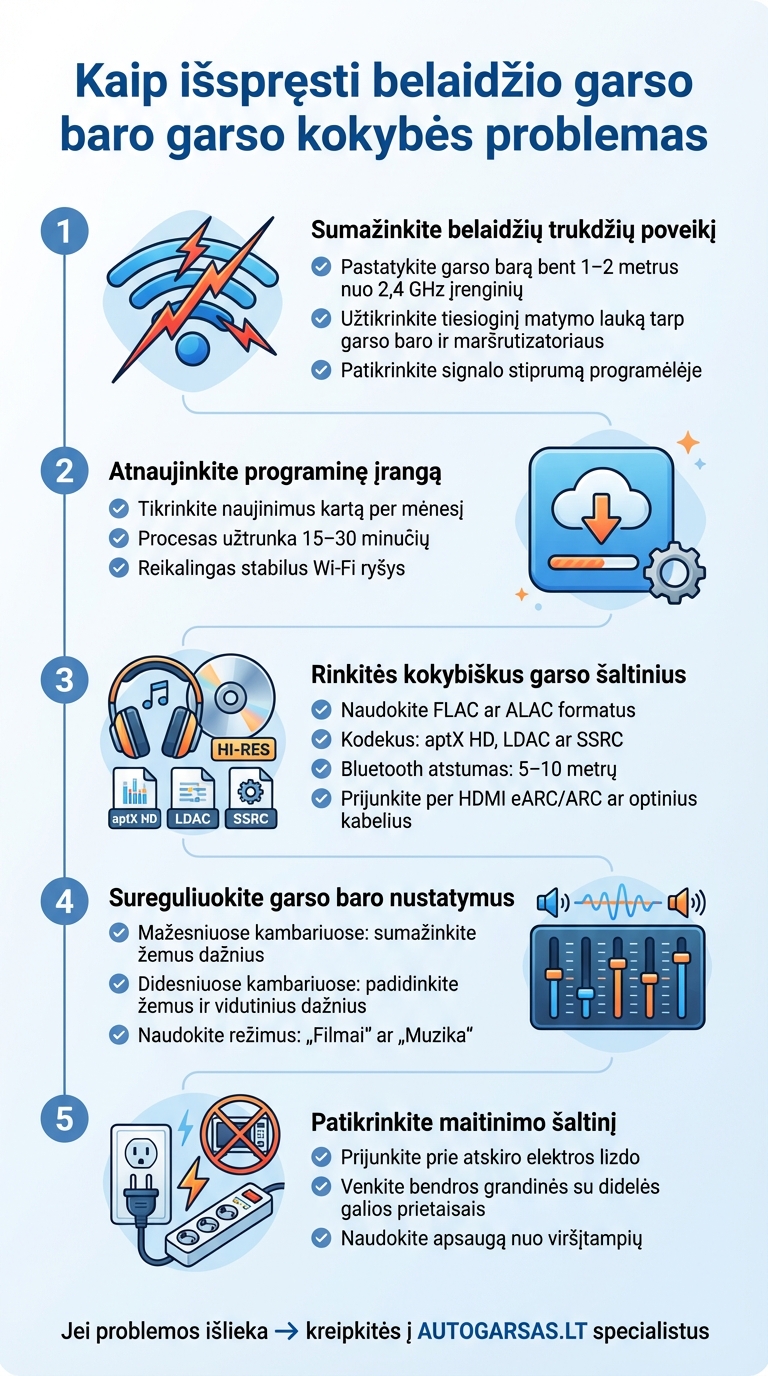
How to fix wireless soundbar sound quality issues: 5-step guide
Once you've identified the possible causes of the problems, it's time to take steps to improve the performance of your soundbar and reduce the likelihood of future problems.
Reduce the effects of wireless interference
Place the soundbar at least 1-2 meters away from devices that operate on the 2.4 GHz frequency, such as microwaves, cordless phones, or Wi-Fi routers. It is also important to ensure a direct line of sight between the soundbar and the router to avoid signal interference.
If you notice crackling or interruptions, try temporarily moving the soundbar away from potential sources of interference. Many soundbar apps allow you to check signal strength and identify problem frequency channels, which makes troubleshooting much easier.
Update the software
If the interference persists despite repositioning the devices, it’s worth checking if your soundbar’s software is up to date. Check for updates regularly, about once a month, to avoid connection issues and audio delays.
The software update usually takes 15-30 minutes, is performed via a dedicated mobile app, and requires a stable Wi-Fi connection. Recent updates often resolve Bluetooth connectivity issues, improve audio codec support, and ensure smooth operation with TVs [2] .
Choose quality sound sources and accessories
Sound quality is not only about a strong signal, but also about a reliable source. Use high-quality streaming formats like FLAC or ALAC , and choose codecs like aptX HD , LDAC or SSRC to ensure a better Bluetooth connection.
If possible, connect your soundbar via HDMI eARC /ARC or optical cables to eliminate potential interference. Also, try to keep your Bluetooth connection within 5-10 meters of your soundbar and avoid connecting multiple devices at the same time.
Adjust the soundbar settings
Use the equalizer settings to tailor the sound to your needs. For example, reduce the bass level in smaller rooms, and boost the low and mid frequencies in larger rooms. Many soundbars offer preset modes, such as "Movies" or "Music."
Some more advanced models have automatic room calibration features that automatically adjust the frequency response based on acoustic measurements. It's also important to ensure that your TV's audio output format matches the codecs supported by your soundbar.
Check the power supply
Make sure the soundbar is plugged into a separate electrical outlet and all cables are properly connected. Avoid sharing a circuit with high-power appliances such as refrigerators or air conditioners, as they can cause voltage fluctuations.
To protect your soundbar from electrical interference, use surge protection solutions. This will ensure a stable power supply and protect your device from potential power surges that can affect sound quality [6] .
Professional AUTOGARSAS.LT support
When you can't solve the problems yourself, it's worth contacting the AUTOGARSAS.LT team. With 27 years of experience, they not only diagnose and fix problems, but also ensure that they don't happen again. Below we will discuss how their specialized solutions can improve your sound quality.
Diagnostic and testing tools
AUTOGARSAS.LT Kaunas showroom uses advanced sound analyzers and signal generators that allow you to accurately identify sources of interference. These tools can detect distortions, signal interruptions, or frequency imbalances that would otherwise be undetectable by conventional methods.
Specialists also perform simulations of real-world usage conditions and use calibrated microphones to assess the acoustics of the room. Such analysis helps to distinguish technical failures from environmental factors. For example, it can be determined whether crackling is caused by a faulty soundbar or its improper placement in the room.
"If anyone is setting up a new house, I recommend consulting with the "Autogaras" team! They sincerely advised how and what wires to run, where and what speakers to place or connect. They put everything together on the project, and later installed the equipment. A true team of professionals!!!" – Daiva
At the Kaunas showroom, customers can bring their soundbars in and have them diagnosed directly. This is especially useful when problems only occur under certain conditions or when using specific devices.
Professional installation and settings
When self-testing fails, professional installation becomes the best solution. AUTOGARSAS.LT specialists will make sure that your soundbar is properly positioned, connected, and calibrated based on the room's acoustics.
The installation takes into account the specifics of Lithuanian homes - from room layout and construction materials to your personal preferences, whether it be movies, music, or TV shows. Specialists also provide recommendations on compatible devices, local electrical standards (230 V, 50 Hz), and streaming content services popular in Lithuania.
"I was choosing a home audio system Sound bar, 5 stars, excellent service, consulted, helped to choose the optimal option, fast delivery. Thank you Autogarsas!! 👍 Denon DHT - S416 fulfilled expectations 100%🙂 simply amazing sound🙌" - Audrius Labutis
A selection of high-end wireless soundbars
AUTOGARSAS.LT offers brands such as JBL , Focal and Dali , whose sound bars are characterized by reliable connectivity and excellent sound quality. These models have automatic room calibration functions, multi-room audio support and the ability to integrate with smart home systems.
For example, Dali soundbars use adaptive wireless technology that automatically changes channels to avoid interference. This is especially useful in multi-apartment homes, where the density of Wi-Fi networks can cause connectivity issues.
At the Kaunas showroom, you have the opportunity to try out various models before making a decision. This allows you to compare their sound quality and functionality in real-world conditions. In addition, our specialists will help you choose the model that best suits your needs and budget, taking into account the size of the room, the purpose of use, and the equipment you have.
You can order services online or directly by visiting the Kaunas salon. Prices are in euros (€) , with clear terms and a transparent billing system.
sbb-itb-02aace5
Do-it-yourself solutions vs. professional services
When you encounter problems with your wireless soundbar, you have two main options: troubleshoot on your own or call in a professional. Before rushing to the service center, it's worth trying a few simple solutions.
Simple troubleshooting steps. If the problem is not serious, you can take immediate action, such as resetting Bluetooth settings, updating the software, or moving the device to a different location. These steps can often resolve the problem without additional cost.
However, do-it-yourself solutions have their limits. If the problems are related to hardware failures, frequency spectrum interference, or mechanical damage, solving them at home can be difficult. In addition, improperly performed actions can not only worsen the situation, but also void the manufacturer's warranty.
When to contact AUTOGARSAS.LT specialists? If basic checks do not help or malfunctions recur, it is worth contacting professionals. AUTOGARSAS.LT specialists, with more than 27 years of experience, work with manufacturer-approved parts and advanced diagnostic tools. This allows them to solve both simple and complex problems, while the warranty remains intact.
Comparison table
| Aspect | Independent solutions | AUTOGARSAS.LT specialist services |
|---|---|---|
| Price | Free | Depends on the nature of the fault |
| Efficiency | Only suitable for simple problems | Solves all problems |
| Time | Fast | Need to schedule time |
| Warranty | May be damaged | Warranty maintained |
| Risk | High – additional failures possible | Small – experts work |
| Tools | Limit | Professional diagnostic tools |
| Support | Internet guides | Personal consultation |
It is worth starting with simple steps - restoring the Bluetooth connection, updating the software or moving the device to another location. If these steps do not help, and especially if you notice mechanical damage, contact AUTOGARSAS.LT specialists.
By visiting the AUTOGARSAS.LT Kaunas showroom, you will be able to get a professional assessment and find out whether your sound bar is worth continuing to use or whether it is time to think about a new, higher-quality model.
Conclusions
Prompt troubleshooting is key to high sound quality and the longevity of your equipment. Problems left untreated can cause not only regular glitches or distortions, but also serious damage to the equipment [1] [3] . Professional help reduces the risk of long-term failures, especially when it comes to high-end equipment, where even the slightest malfunction can affect the operation of the entire system.
AUTOGARSAS.LT specialists offer a comprehensive package of services – from modern diagnostic tools to precise installation and individual consultations. Their accumulated experience allows not only to accurately determine the causes of problems, but also to ensure long-term reliability and high sound reproduction quality.
As discussed earlier, issues ranging from wireless interference to improper installation can be effectively addressed with a systematic approach. Regular inspections by professionals not only help maintain optimal performance of your wireless soundbar, but also extend the life of the device.
If your sound system is experiencing interference or distortion that you cannot fix on your own, visit the AUTOGARSAS.LT Kaunas showroom . Here, professionals will assess the situation and offer the best solution to your soundbar problems. Trust their knowledge and ensure impeccable sound quality.
FAQs
How do I update the software of my wireless soundbar?
First, check to see if the manufacturer offers an official mobile app or online platform for software updates. There are usually several ways to update: through an app, by connecting the soundbar to Wi-Fi or Bluetooth, or using a USB connection and a computer.
It is very important to follow the manufacturer's instructions exactly to ensure that the update is safe and does not cause any disruptions. If you encounter any difficulties, it is worth contacting specialists. AUTOGARSAS.LT experts can provide professional assistance and advice to ensure that your sound system works smoothly and flawlessly.
How to reduce the impact of wireless interference on the soundbar's quality?
To avoid wireless interference that can affect the performance of your soundbar, there are a few key things to consider:
- Choose reliable equipment – choose high-quality audio devices that ensure a stable and reliable wireless connection.
- Reduce sources of interference – avoid placing the soundbar near other electronic devices that may cause signal interference.
- Ensure a strong connection – make sure the Wi-Fi or Bluetooth signal is strong enough and the devices are not too far apart.
- Proper location – Place the device away from walls, metal surfaces, or other objects that may interfere with the signal.
By carefully selecting the equipment and adjusting it properly, you can enjoy smooth and clear sound without any interference. If you have any questions or need help, it is worth consulting with specialists who will help you find the optimal solution for your needs.
When should you contact AUTOGARSAS.LT specialists regarding sound quality problems with a wireless sound bar?
It is worth contacting AUTOGARSAS.LT specialists if you are experiencing quality problems with your wireless sound bar, such as interference or sound distortion, that you cannot resolve on your own.
Our team is also ready to help with more complex technical issues that require specific knowledge, accurate fault diagnosis or specialized equipment. Our experts will not only find the best solution, but also ensure that your sound system runs smoothly and meets all your expectations.


