

Choosing an HDMI cable depends on your equipment's needs. If you're using Full HD displays or older technology, HDMI 1.4 is sufficient. To enjoy 4K resolution and HDR technology, opt for HDMI 2.0. If you have the latest equipment, such as a PlayStation 5 or an 8K TV, you'll need HDMI 2.1.
Key Differences:
- HDMI 1.4: Supports 4K@30Hz, 10.2 Gbps bandwidth, basic features.
- HDMI 2.0: 4K@60Hz, 18 Gbps bandwidth, HDR, and improved audio quality.
- HDMI 2.1: 8K@60Hz, 4K@120Hz, 48 Gbps bandwidth, HDMI ARC vs eARC comparison, and other advanced features.
Price doesn't always equal quality. A digital signal either transmits or it doesn't. More expensive cables won't improve picture quality, but certified cables ensure the necessary bandwidth. If you need a longer cable (more than 5 m), choose optical variants.
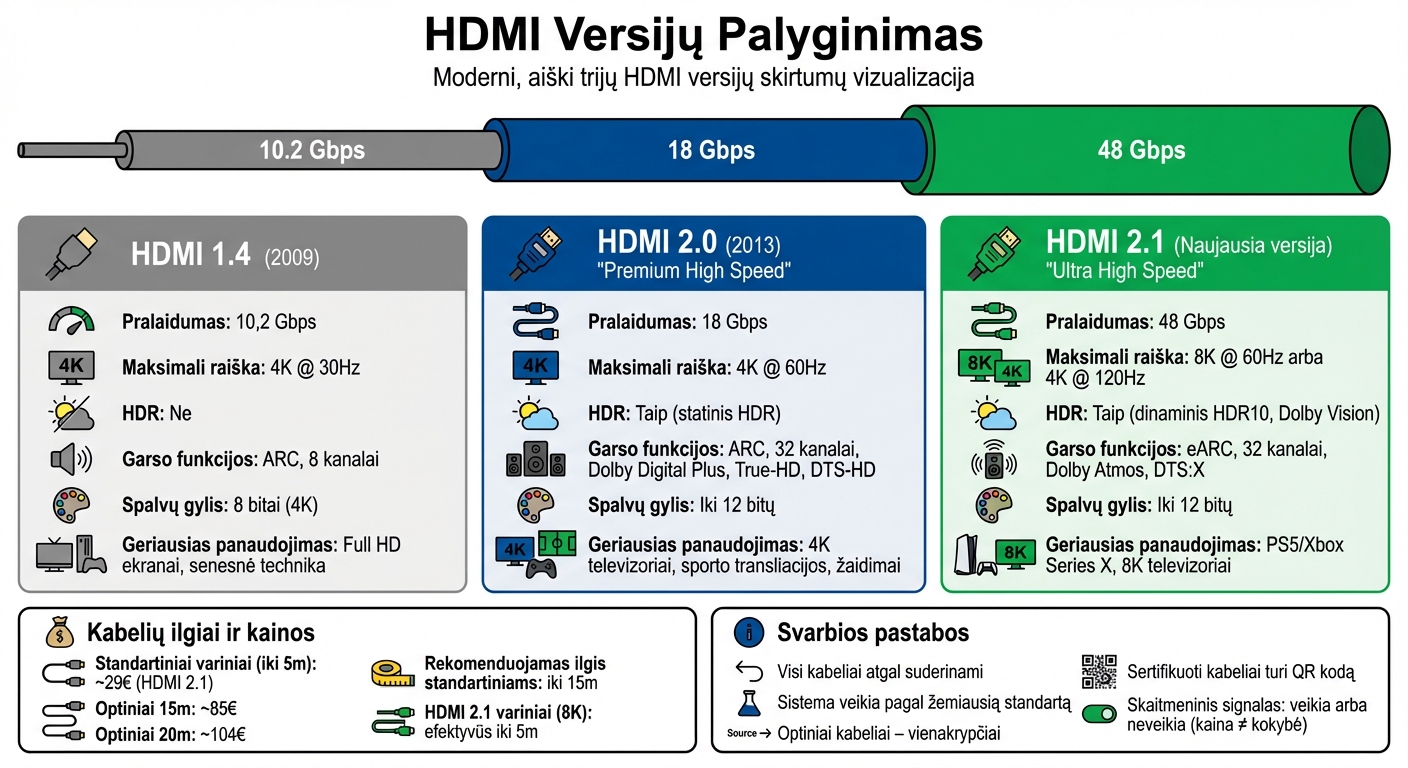
HDMI 1.4 vs 2.0 vs 2.1 version comparison: resolution, bandwidth, and features
Every HDMI Version Explained in Detail
sbb-itb-02aace5
1. HDMI 1.4
Before moving on to newer HDMI versions, it's worth understanding what HDMI 1.4 offers.
Resolution and Refresh Rate
Introduced in May 2009, HDMI 1.4 was the first version to support 4K resolution (up to 4096×2160 pixels), but only at a frequency of 24–30 Hz. Full HD (1080p) resolution could reach up to 120 Hz. This means that in dynamic scenes, the image may appear less smooth. However, for office monitors or standard televisions, this option may still be suitable [3].
Bandwidth
HDMI 1.4 offers 10.2 Gbps bandwidth, which limits the transmission of 4K content at a higher refresh rate. In comparison, HDMI 2.0 bandwidth reaches 18 Gbps, and HDMI 2.1 – an impressive 48 Gbps. Additionally, HDMI 1.4 supports only 8-bit color depth at 4K resolution, while newer versions can transmit up to 12-bit color depth, which ensures better image quality [3].
Support for Modern Features
Limited resolution and refresh rate capabilities explain why it's important to choose a cable based on equipment needs. HDMI 1.4 does not support HDR technology, which improves image contrast, or eARC functionality for high-quality audio, such as Dolby Atmos. Nevertheless, this version supports ARC, allowing audio to be transmitted from the TV to the sound system via a single cable. Additionally, HDMI 1.4 introduced 3D video support, an Ethernet channel, and supports up to 8 uncompressed audio channels with a 192 kHz sampling rate [3].
Equipment Compatibility
HDMI 1.4 cables and connectors are backward compatible with earlier HDMI versions (1.0–1.3). However, when an HDMI 1.4 cable is connected to an HDMI 2.1 port, the system will operate according to the lowest standard – in this case, HDMI 1.4. This version is still commonly used in budget electronics, such as 24 and 27-inch 1080p monitors, set-top boxes, and office projectors. It is a suitable choice for devices that use Full HD technology [3].
In the next section, we will discuss HDMI 2.0, which offers greater bandwidth and additional features.
2. HDMI 2.0
Introduced in 2013, HDMI 2.0, also known as "Premium High Speed," brought significant improvements compared to the previous version.
Resolution and Refresh Rate
HDMI 2.0 supports 4K resolution (3840×2160 pixels) with a 60 Hz refresh rate – twice that of HDMI 1.4, which only provided 4K resolution at 30 Hz [2]. This improvement results in much smoother video playback, especially when watching sports broadcasts, action movies, or playing computer games.
Bandwidth
This version ensures a data transfer rate of 18 Gbps, which is almost double that of HDMI 1.4 (10.2 Gbps) [2]. Higher bandwidth allows reliable transmission of 4K video at 60 frames per second. For standard HDMI cables, it is recommended not to exceed 15 meters in length, and for longer distances, it is advisable to use optical cables to avoid signal loss [2].
Support for Modern Features
HDMI 2.0 introduces static HDR for the first time, which improves image contrast and color depth. However, dynamic HDR, such as "Dolby Vision," is only available with HDMI 2.1. This version also supports HDMI ARC or optical connection, allowing audio to be transmitted from the TV to the sound system via a single cable. In addition, it supports audio formats such as Dolby Digital Plus, True-HD, and DTS-HD [2].
Equipment Compatibility
To take advantage of HDMI 2.0 capabilities, all components – source, display, and cable – must comply with this version's specifications. HDMI 2.0 uses the same connectors (Type A, Mini Type C, and Micro Type D) as previous versions, making it compatible with older equipment. For port identification, use labels that indicate "HDMI 2.0" or "4K@60Hz." If no such markings are present, you can find the information in the device's manual [2].
In the next section, we will discuss the HDMI 2.1 version, which goes even further and offers even more possibilities.
3. HDMI 2.1
When it comes to the latest technologies, HDMI 2.1 stands out as a modern solution adapted to the needs of modern gaming consoles, 8K TVs, and advanced home cinema systems. This version, often called "Ultra High Speed," offers a significant leap forward.
Resolution and Refresh Rate
HDMI 2.1 supports 8K resolution (7680×4320 pixels) at 60 Hz refresh rate and 4K resolution at 120 Hz frequency [2]. This means extremely smooth visuals, which is particularly important for gaming enthusiasts seeking a more realistic and dynamic experience.
Bandwidth
This version's bandwidth reaches an impressive 48 Gbps, more than double the capabilities of HDMI 2.0 [2]. Standard copper HDMI 2.1 cables ensure efficient operation up to 5 meters when transmitting an 8K signal [2]. If a longer cable is required, it is recommended to choose optical HDMI cables (AOC), which maintain signal quality up to 100 meters. For example, a 15-meter optical cable costs approximately €85, and a 20-meter one – around €104 [2].
Modern Features
HDMI 2.1 supports dynamic HDR format, including HDR10 and Dolby Vision, ensuring rich colors and excellent contrast [2]. Additionally, this version offers eARC (Enhanced Audio Return Channel), allowing the transmission of high-quality audio, such as Dolby Atmos or DTS:X formats. Support for up to 32 audio channels enables the creation of an impressive home cinema system with various speakers [2].
Equipment Compatibility
To fully utilize the benefits of HDMI 2.1, both the source (e.g., gaming console or computer) and the display (TV or monitor) must support this specification [2]. The cable must be marked with an "Ultra High Speed HDMI" label, and the ports with inscriptions such as "HDMI 2.1" or "HDMI 4K@120Hz" [2]. However, it's worth noting that not all devices with an HDMI 2.1 port support all features of this version – this must be checked in the device's manual. It's also important to know that optical HDMI cables are unidirectional, so the connectors are marked "Source" and "Display" [2]. By choosing the right HDMI 2.1 cable, you will ensure optimal performance of your equipment.
Advantages and Disadvantages
Let's look at the differences between HDMI versions, highlighting their strengths and weaknesses, to make it easier to understand which one best suits your needs.
Each HDMI version has its advantages, but its suitability depends on the equipment used and the planned functions. The table below shows the main differences between each version:
| Feature | HDMI 1.4 | HDMI 2.0 | HDMI 2.1 |
|---|---|---|---|
| Maximum Bandwidth | 10.2 Gbps | 18 Gbps | 48 Gbps |
| Maximum Resolution | 4K @ 30 Hz | 4K @ 60 Hz | 8K @ 60 Hz / 4K @ 120 Hz |
| HDR Support | No | Yes (basic HDR) | Yes (HDR 10, Dolby Vision) |
| Audio Features | ARC, 8 channels | ARC, 32 channels | eARC, 32 channels, Dolby Atmos, DTS:X |
| Best Use | Older TVs, Full HD | 4K streaming, standard 4K TVs | 8K TVs, next-gen gaming (PS5/Xbox Series X) |
HDMI 1.4 is a suitable choice for those using Full HD displays or older 4K televisions. It is economical, but 4K resolution at 30 Hz can limit video smoothness. HDMI 2.0, with its 4K @ 60 Hz capability and HDR support, becomes an excellent solution for movie enthusiasts and gamers. Meanwhile, HDMI 2.1 is the best option for those who want to use the latest technologies – it supports 8K resolution, 120 Hz, and advanced audio features, but requires compatible equipment.
Cable Price Differences
When choosing HDMI cables, it's worth considering price and quality. Since HDMI cables transmit a digital signal, their operation is twofold: they either work or they don't. More expensive cables won't improve image quality, but certified "Ultra High Speed" cables ensure the necessary bandwidth. For example, a 5-meter HDMI 2.1 cable costs about €29 and supports 48 Gbps bandwidth.
If a longer cable (more than 5 m) is needed, it is worth choosing optical cables. They maintain signal quality even up to 100 meters, but are more expensive and unidirectional. For example, a 15-meter optical cable costs around €85, and a 20-meter one – about €104. Meanwhile, for short distances (up to 3–5 m), copper cables are an economical and practical solution.
Conclusions
When choosing an HDMI cable, it's essential to consider your equipment's capabilities and needs. If you're using Full HD displays or older technology, HDMI 1.4 will be perfectly sufficient. However, for those who want to enjoy 4K resolution video with a 60 Hz refresh rate and HDR, the best solution is HDMI 2.0.
HDMI 2.1 is only necessary if you are using the latest gaming consoles, such as PlayStation 5 or Xbox Series X, or 8K televisions. This standard allows you to enjoy 4K video at 120 Hz and supports advanced features such as VRR (Variable Refresh Rate) and ALLM (Auto Low Latency Mode). Also, 48 Gbps bandwidth ensures compatibility with future technologies [4].
Regarding prices, it's worth remembering that a digital signal either works or it doesn't. Therefore, the most important criterion is an official "Ultra High Speed HDMI" certification. The packaging should have a QR code confirming certification [1]. As mentioned, for short distances (up to 5 meters), a standard copper cable will suffice, while for longer distances, optical (active) cables are recommended.
Most importantly – choose certified cables, as the brand name does not affect performance. If you are using a regular 4K TV without the latest gaming consoles, an HDMI 2.0 cable will be suitable. HDMI 2.1 is worth choosing only if your equipment supports the features of this standard.
FAQs
How do I know if my TV and device support HDMI 2.1 features?
To confirm whether your TV and device support HDMI 2.1, it's worth checking their technical specifications or user manuals. Usually, they indicate which HDMI version is supported. You can also check the port labels, such as "HDMI 2.1" or "4K@120Hz." It's important that both devices support HDMI 2.1, otherwise, even with an HDMI 2.1 cable, video and audio quality may be limited.
Does an HDMI 2.0 cable support 4K HDR, and when is it not enough?
An HDMI 2.0 cable can transmit 4K HDR video, as its bandwidth reaches up to 18 Gbps. This allows you to enjoy 4K resolution with HDR technology and a higher refresh rate. However, if you want to use 8K or even higher resolution devices, you will need an HDMI 2.1 cable, which supports higher bandwidth and more advanced features.
When is it worth choosing an optical HDMI cable instead of a copper one?
It's worth choosing an optical HDMI cable when you need higher data transfer speeds, less signal loss, and the ability to use longer cables without compromising quality. This becomes particularly relevant when using modern high-resolution systems that require high bandwidth and guaranteed video quality.


